Class C IP Address: Ranges, Masks and Subnetting
Class C IP address explained: ranges, default /24 masks, private blocks and step-by-step subnetting for UK networks.
In this article
- Class C Ranges and Default Masks at a Glance
- The Two Addresses You Can't Assign
- Reading Class C Addresses in Binary
- Why the Range Starts and Ends Where It Does
- Checking the Boundary Cases
- A Three-Step Method You Can Do by Hand
- Why Class C Existed and Why It Is Legacy
- Where the Waste Crept In
- Private and Public Class C-Sized Ranges Today
- How Private Addresses Reach the Internet
- Public Space Is a Different Conversation
- How to Subnet a Class C Network Step by Step
- Working Through 192.168.10.0/24
- Every Common Split of a /24
- Configuring Class C Subnets on Linux, Windows and Routers
- Linux
- Windows
- Cisco IOS Router
- Checks and the Two Errors That Cause Most Callouts
- Choose the Prefix Length for Your Next Network
- Four Questions Before You Pick a Prefix
- Documenting Public Space Properly
A Class C IP address has a first octet from 192 to 223, spanning 192.0.0.0 to 223.255.255.255, with a default subnet mask of 255.255.255.0, or /24. Each network contains 256 total addresses and 254 usable host addresses.
If modern networks don't allocate addresses by class, why does this old label still appear in router menus, exam questions and office documentation? Because people still use "Class C" as shorthand for a /24-sized block, even when the prefix they've configured is something else. Learning to translate between the two languages stops you misreading old diagrams and helps you size a UK network around real device counts, rather than around a label from the 1980s.
Class C Ranges and Default Masks at a Glance
A Class C IPv4 address has a first octet between 192 and 223, a default mask of 255.255.255.0 (/24), 256 total addresses per network and 254 usable hosts. That's the whole definition in one line, and everything else follows from where the mask splits network bits from host bits.
Placed beside the other unicast classes, the pattern is easy to see. Moving from Class A down to Class C, each class gives up host capacity in exchange for far more separate networks. Class A suits a small number of very large networks, Class B sits in the middle, and Class C was designed for many small networks that each needed only a modest number of devices.
Classful IPv4 ranges, default masks and host counts
| Class | First octet range | Default mask | CIDR prefix | Total addresses | Usable hosts |
|---|---|---|---|---|---|
| A | 1 to 126 | 255.0.0.0 | /8 | 16,777,216 | 16,777,214 |
| B | 128 to 191 | 255.255.0.0 | /16 | 65,536 | 65,534 |
| C | 192 to 223 | 255.255.255.0 | /24 | 256 | 254 |
The Two Addresses You Can't Assign
Every conventional subnet reserves its first and last addresses. In 192.168.1.0/24, the address 192.168.1.0 names the network itself, and 192.168.1.255 is the broadcast address that reaches every host on that subnet. Devices therefore take addresses from 192.168.1.1 to 192.168.1.254, which is where the figure of 254 usable hosts comes from.
One gap in the table deserves a note. Addresses beginning with 127 match the Class A bit pattern but form the loopback range, used when a device talks to itself, so they're excluded from Class A's usable space.
Quick test: read the first number of any IPv4 address. If it sits between 192 and 223, the classful default is /24, even if the live network uses a different prefix.
That last point matters when you're reading other people's documentation. The first octet tells you what the old system would have assumed, not what an engineer has configured today. Always check the mask or prefix written next to the address before you act on it.
Reading Class C Addresses in Binary
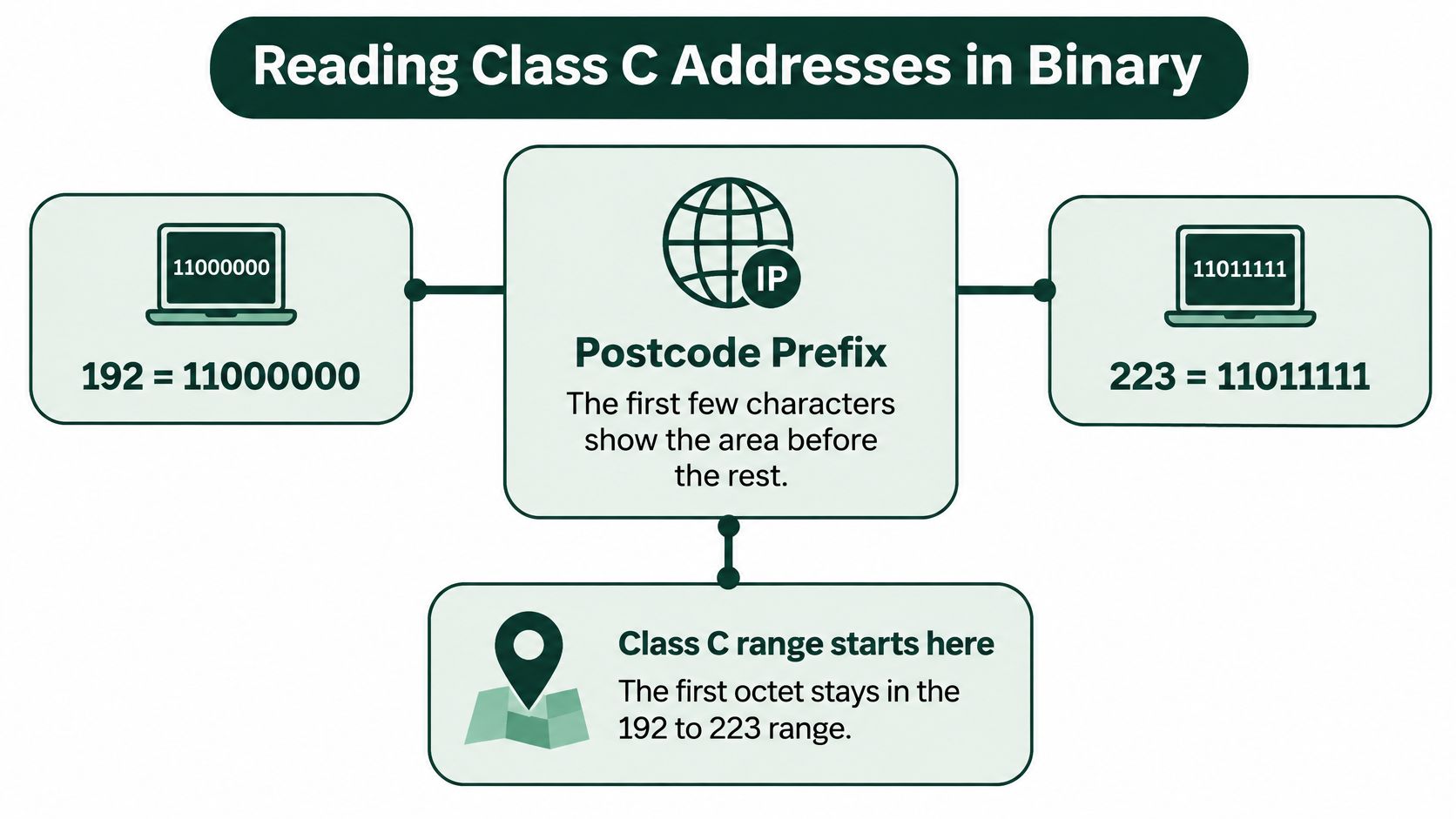
Think of the first octet like the outward part of a postcode. The first few characters tell you the area before you've read the rest, and routers originally did the same with the leading bits of an address. You don't need the full 32 bits to find the class. You only need the first octet.
The visual below maps that idea against the two ends of the Class C range.
Why the Range Starts and Ends Where It Does
In binary, 192 is 11000000 and 223 is 11011111. Read those two values side by side and the shared prefix jumps out. Every Class C address begins with the bits 110, and the five bits after that prefix vary freely. When those five bits are all zero you get 192, and when they're all one you get 223, which is exactly why the range has those boundaries and no others.
Try a value in the middle. 200 is 11001000, which starts with 110, so 200.14.3.9 is Class C. The remaining octets, and the host bits inside the first octet, don't change that result.
Checking the Boundary Cases
Boundary cases show the rule working at its edges:
- 191 is 10111111: it starts with 10, so it belongs to Class B, one step below the Class C range.
- 192 is 11000000: the first value starting with 110, so Class C begins here.
- 223 is 11011111: the last value starting with 110, so Class C ends here.
- 224 is 11100000: it starts with 1110, which makes it Class D multicast rather than ordinary unicast space.
A Three-Step Method You Can Do by Hand
First, write the first octet in binary, padding it to eight bits. Second, read the leading bits from the left and find where the run of ones stops. Third, match that pattern to the class: a leading 0 means Class A, 10 means Class B, 110 means Class C, 1110 means Class D and 1111 means Class E. Once you've matched the prefix, stop. Everything after it identifies networks and hosts, and none of it affects the class.
Why Class C Existed and Why It Is Legacy
Classful addressing worked like a courier that only stocked three fixed box sizes. Whatever you shipped had to go in the nearest box, whether it filled the box or rattled around inside it. Class C was the small box, and for a small office in the early internet years it was usually the right one.
The warehouse image below captures that fixed-size thinking better than any diagram.

According to the IP Ferret guide to IP address classes, Class C formed part of IPv4's original classful system from the early 1980s, used 21 bits for the network identifier and 8 bits for hosts, and allowed approximately 2,097,152 theoretical Class C networks. That guide also notes the system was replaced by Classless Inter-Domain Routing (CIDR) in 1993.
Where the Waste Crept In
Fixed sizes punish anyone who doesn't fit neatly. An organisation with 300 devices outgrew a Class C block and had to take a Class B block with tens of thousands of host addresses it would never use. At the other end, an organisation with 20 devices still received a full small block, leaving most of its addresses idle.
CIDR removed the fixed boxes. An engineer can now place the boundary between network and host bits wherever the design needs it, so a network can be sized closely to the number of devices it will hold.
A Class C label describes a historical size, not a current rule.
You'll still meet the term in legacy UK business networks, data-centre diagrams and older supplier documents, where a /24 is casually called a Class C network. Read it as a size clue, then confirm the actual prefix. In anything you write yourself, use /24 and keep Class C for explaining history.
Private and Public Class C-Sized Ranges Today
Private address space is where most Class C-sized networks live today. RFC 1918 reserves three blocks that anyone may use inside their own network without registering them, asking permission or paying for them. The same private address can exist in thousands of unrelated networks at once, because none of them route that traffic onto the public internet.
Private IPv4 ranges (RFC 1918)
| Private block | CIDR prefix | Address range | Total addresses |
|---|---|---|---|
| 10.0.0.0/8 | /8 | 10.0.0.0 to 10.255.255.255 | 16,777,216 |
| 172.16.0.0/12 | /12 | 172.16.0.0 to 172.31.255.255 | 1,048,576 |
| 192.168.0.0/16 | /16 | 192.168.0.0 to 192.168.255.255 | 65,536 (256 Class C-sized /24 blocks) |
That last block explains the address on almost every UK home and small office router. 192.168.0.0/16 contains 256 separate /24 networks, from 192.168.0.0 through to 192.168.255.0, so a router vendor can pick one, such as 192.168.1.0/24, and leave the rest untouched.
How Private Addresses Reach the Internet
A private address isn't routed across the public internet, so a device using one can't be reached directly from outside. Your router bridges the gap with network address translation (NAT), rewriting private source addresses to its own public address as traffic leaves, then reversing the change on replies. One public address can therefore serve a whole office of privately addressed devices.
Public Space Is a Different Conversation
An address outside the three private blocks isn't automatically usable online. It must be globally routable and assigned to you, and some ranges are reserved for special purposes. 192.0.2.0/24, for example, is set aside for documentation and examples, so it never carries real traffic.
Supply is the main constraint for UK organisations. The RIPE NCC update from January 2020 records that RIPE NCC announced on 25 November 2019 that it had run out of available IPv4 addresses from its general pool, and that roughly 13,500 IPv4 blocks had been transferred by January 2020. The same update describes a waiting list under which eligible Local Internet Registries could receive only a single /24, equal to 256 addresses.
- Existing holdings: many operators still rely on space allocated years ago.
- Provider assignments: your ISP lends you addresses from its own blocks.
- Transfers: unused space moves between organisations under registry rules.
Working rule: check an address against the private table before you assume it's routable, and treat any public /24 as a scarce asset you must justify.
How to Subnet a Class C Network Step by Step
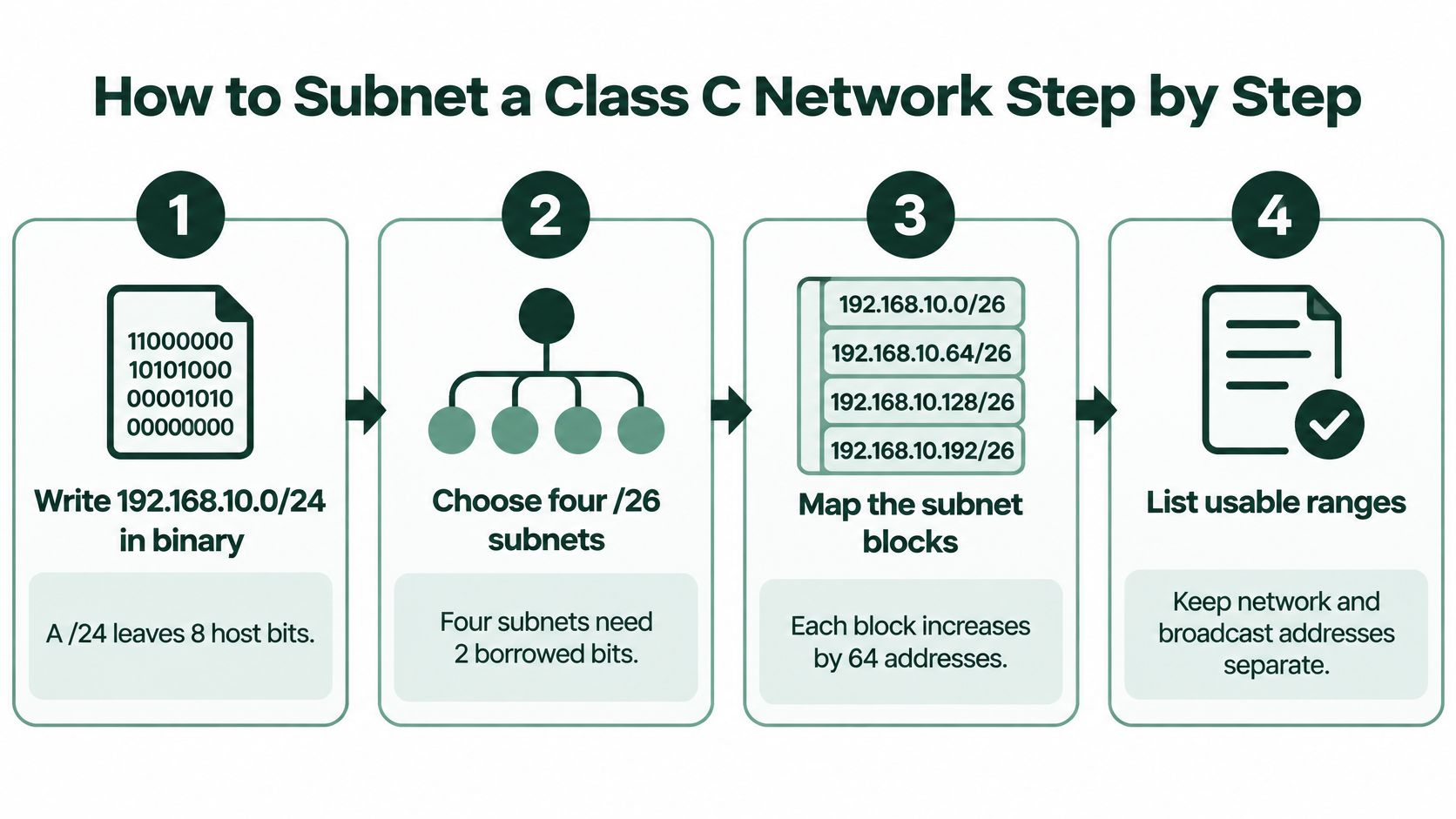
Subnetting means borrowing host bits to create several smaller networks inside one block. We'll split 192.168.10.0/24 into four equal subnets, because four is large enough to show the pattern without burying you in arithmetic. Every step below uses the same few numbers, so keep them in view.
The process diagram summarises the route before we work through it.
Working Through 192.168.10.0/24
- Count the host bits you start with. A /24 fixes the first three octets, leaving the last octet, or 8 host bits, for us to divide.
- Decide how many bits to borrow. Four subnets need 2 borrowed bits, because two bits give four combinations: 00, 01, 10 and 11. Adding them to the prefix gives /26.
- Calculate the block size. Dividing 256 addresses by four subnets gives a block size of 64. Subnets therefore start at .0, .64, .128 and .192 in the last octet.
- Write out the first subnet in full. Its network address is 192.168.10.0, usable hosts run from 192.168.10.1 to 192.168.10.62, and its broadcast address is 192.168.10.63.
- Repeat the pattern for the rest. The remaining subnets sit at .64, .128 and .192, each with 62 usable addresses between its network and broadcast addresses.
| Subnet | Network address | Usable host range | Broadcast address |
|---|---|---|---|
| 1 | 192.168.10.0 | 192.168.10.1 to 192.168.10.62 | 192.168.10.63 |
| 2 | 192.168.10.64 | 192.168.10.65 to 192.168.10.126 | 192.168.10.127 |
| 3 | 192.168.10.128 | 192.168.10.129 to 192.168.10.190 | 192.168.10.191 |
| 4 | 192.168.10.192 | 192.168.10.193 to 192.168.10.254 | 192.168.10.255 |
- Check your arithmetic. Usable hosts always equal the block size minus two, so 64 minus two gives the 62 hosts in each row. Four subnets of 64 addresses also add back up to the original 256, which confirms nothing has been lost or double counted.
- Place a host in its subnet. Take 192.168.10.150 and find which block contains 150. It falls between .128 and .191, so its network is 192.168.10.128 and its broadcast is 192.168.10.191.
For a spoken walkthrough of the same borrowing process, the video below works through subnetting examples on screen.
Every Common Split of a /24
Subnet sizes inside a /24 block
| Prefix | Subnet mask | Subnets | Usable hosts per subnet | Block size |
|---|---|---|---|---|
| /24 | 255.255.255.0 | 1 | 254 | 256 |
| /25 | 255.255.255.128 | 2 | 126 | 128 |
| /26 | 255.255.255.192 | 4 | 62 | 64 |
| /27 | 255.255.255.224 | 8 | 30 | 32 |
| /28 | 255.255.255.240 | 16 | 14 | 16 |
| /29 | 255.255.255.248 | 32 | 6 | 8 |
| /30 | 255.255.255.252 | 64 | 2 | 4 |
Read the table from your requirement, not from the top. If you need six separate groups, you need at least eight subnets, so you'd choose /27 and accept 30 hosts in each. If one group needs 50 devices, /26 is the smallest option that fits, whatever the other groups need.
Notice the cost of splitting. Each subnet gives up two addresses to its network and broadcast addresses, so eight /27 subnets consume 16 reserved addresses where the undivided block consumed two. Smaller subnets lose a larger share of their space this way, which is why a /30 keeps only half its four addresses for hosts.
Scale makes careful splitting worthwhile. Geoff Huston's country-level IPv4 allocation dataset for 2023 associates the United Kingdom with 118,691,720 IPv4 addresses, representing 2.763507% of the global allocation, so UK addressing sits inside a large but finite pool that nobody can extend.
Configuring Class C Subnets on Linux, Windows and Routers
Configuration is where the old label disappears. No operating system asks you for a class. Each one asks for an address, a prefix length or mask, and usually a gateway, which is CIDR thinking in practice. The examples below place a host at 192.168.10.10 in the 192.168.10.0/24 network split in the subnetting walkthrough, with the router at 192.168.10.1.
Linux
Add the address with sudo ip addr add 192.168.10.10/24 dev eth0. The /24 on the end is the part that matters most, because it tells the machine which destination addresses are local. Then set the route out with sudo ip route add default via 192.168.10.1.
Those commands change the running system only, and a reboot wipes them. To keep the settings, write them into netplan on Ubuntu server builds or save the connection profile in NetworkManager on desktop and many server installs. Test with the commands first, then make the working version permanent.
Windows
In a PowerShell window opened as Administrator, run New-NetIPAddress -InterfaceAlias 'Ethernet' -IPAddress 192.168.10.10 -PrefixLength 24 -DefaultGateway 192.168.10.1. Here -PrefixLength 24 does the same job as the /24 in the Linux command, and it sets the gateway in the same step.
Older Windows systems and some recovery environments use netsh instead, where you'd type the mask in full as 255.255.255.0. The two forms describe the identical boundary, so use whichever the machine in front of you supports.
Cisco IOS Router
The router needs the gateway address on its LAN interface. Enter global configuration mode with configure terminal, select the interface with interface GigabitEthernet0/1, then apply ip address 192.168.10.1 255.255.255.0. Finish with no shutdown, because Cisco interfaces often sit administratively down until you enable them, and a correctly addressed interface that's shut down passes nothing.
Checks and the Two Errors That Cause Most Callouts
Start simple and work outward:
- Ping the gateway:
ping 192.168.10.1proves the local link and addressing agree. - Confirm the route: run
ip route showon Linux orGet-NetIPConfigurationon Windows and check the default route points at the gateway. - Confirm the interface is up: a down interface explains total silence better than any addressing theory.
If a host can ping its gateway but nothing beyond it, suspect the route or the router, not the host address.
Two mistakes account for most failed setups. A mask that doesn't match the router makes the host misjudge which addresses are local, so it may never send traffic for neighbouring subnets to the gateway at all. A gateway outside the subnet is worse, because the device has no way to reach the very address meant to forward its traffic, and many systems reject the setting outright. Check both before you start swapping cables.
Choose the Prefix Length for Your Next Network
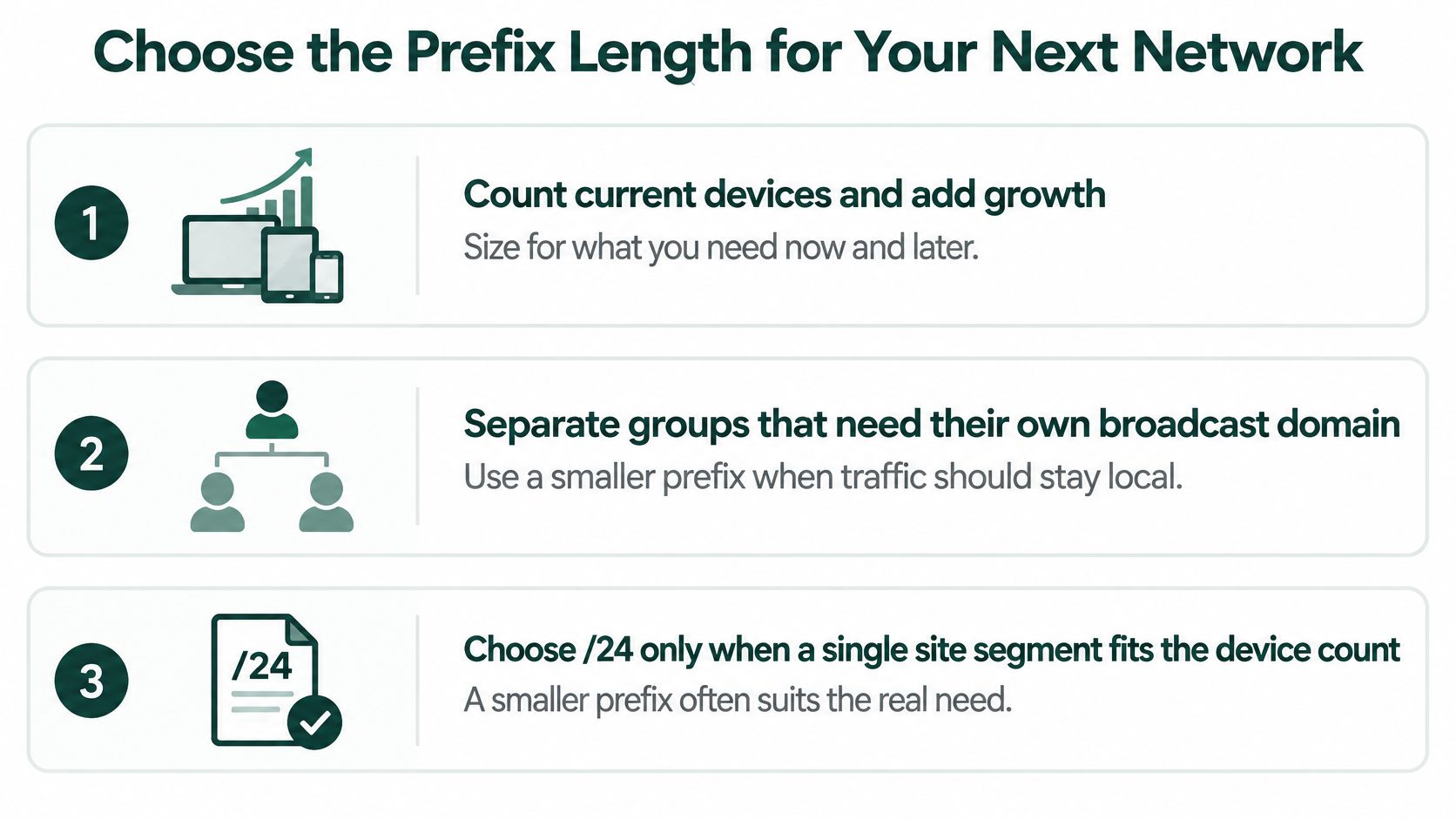
A /24 suits a single site segment with a clear, comfortably fitting device count. It stops suiting you the moment different kinds of traffic need different treatment, because one large subnet puts every device in the same broadcast domain and behind the same access rules. Size by need, not by habit.
The checklist below sets out the order to make those decisions in.
Four Questions Before You Pick a Prefix
- Count devices, then add growth: include printers, phones, access points and the kit nobody puts on the asset list.
- Separate groups needing different controls: guest Wi-Fi, CCTV and industrial equipment such as balers or compactors shouldn't share a trust level with staff laptops.
- Decide what truly needs a public address: most internal devices don't, and each public address is an exposure to manage.
- Plan IPv6 alongside IPv4: dual-stack design now is cheaper than retrofitting it onto a cramped IPv4 plan later.
Say a small site has 40 staff devices and 10 operational devices. One /24 would hold them easily, but it would also let a compromised camera sit beside the finance laptop. A /26 for staff leaves room to grow past 60 devices, while a /27 for equipment holds the 10 devices with headroom, and the router or firewall controls what passes between them.
Documenting Public Space Properly
Where a service genuinely needs public addressing, request only what you can justify and record the exact prefix, gateway, reverse DNS arrangements and named owner in an IPAM inventory. Apply ingress and egress filtering, keep network and broadcast addresses reserved, and don't expose internal operational systems directly to the internet.
Scarcity enforces this discipline anyway. RIPE NCC's IPv4 run-out page reports that 901 LIRs were on the waiting list in November 2025, and that the first organisation in the queue had waited 552 days, with eligible members able to request only a single /24 allocation. A public block is therefore a justified asset with a queue behind it, not a routine purchase.
For most UK small businesses, the sensible default is private addressing behind NAT, a small number of provider-assigned public addresses for published services, and IPv6 planned from the start. Your final checklist is short: count devices, group by trust level, pick each prefix, record it in the inventory, and replace "Class C" with the prefix in every document you issue.
Sites that run balers, compactors, CCTV and a customer portal need their networks segmented as carefully as their waste streams, and that's the operational world Gegan works in every day as a UK environmental management partner covering total waste and recycling management, equipment supply and carbon reporting for single and multi-site businesses. If you're reviewing site operations end to end, from network documentation to compliant, data-led waste systems, visit Gegan and talk to the team about bringing the same auditable order to your waste programme.